
The automation landscape is shifting faster than most organizations can keep up. While you’ve likely implemented RPA tools, workflow platforms, or even some AI assistants, there’s a new player changing how businesses think about intelligent automation: Model Context Protocol, or MCP. This isn’t another buzzword—it’s a standardized approach that’s making AI agents actually useful for real business tasks. If you’re evaluating automation strategies for 2025, understanding MCP’s practical applications could save you months of trial and error. That gap between concept and working system is exactly where our Custom MCP Server Development Services come in.
Table of Contents
- What Is MCP and Why Should Business Leaders Care?
- Real-World Applications: Where MCP Makes Immediate Impact
- The Business Case: ROI and Implementation Considerations
- Security and Governance: What CXOs Need to Know
- Getting Started: A Pragmatic Roadmap
- The Strategic Perspective: MCP in Your 2025 Technology Stack
- Conclusion: Taking the Next Step
What Is MCP and Why Should Business Leaders Care?
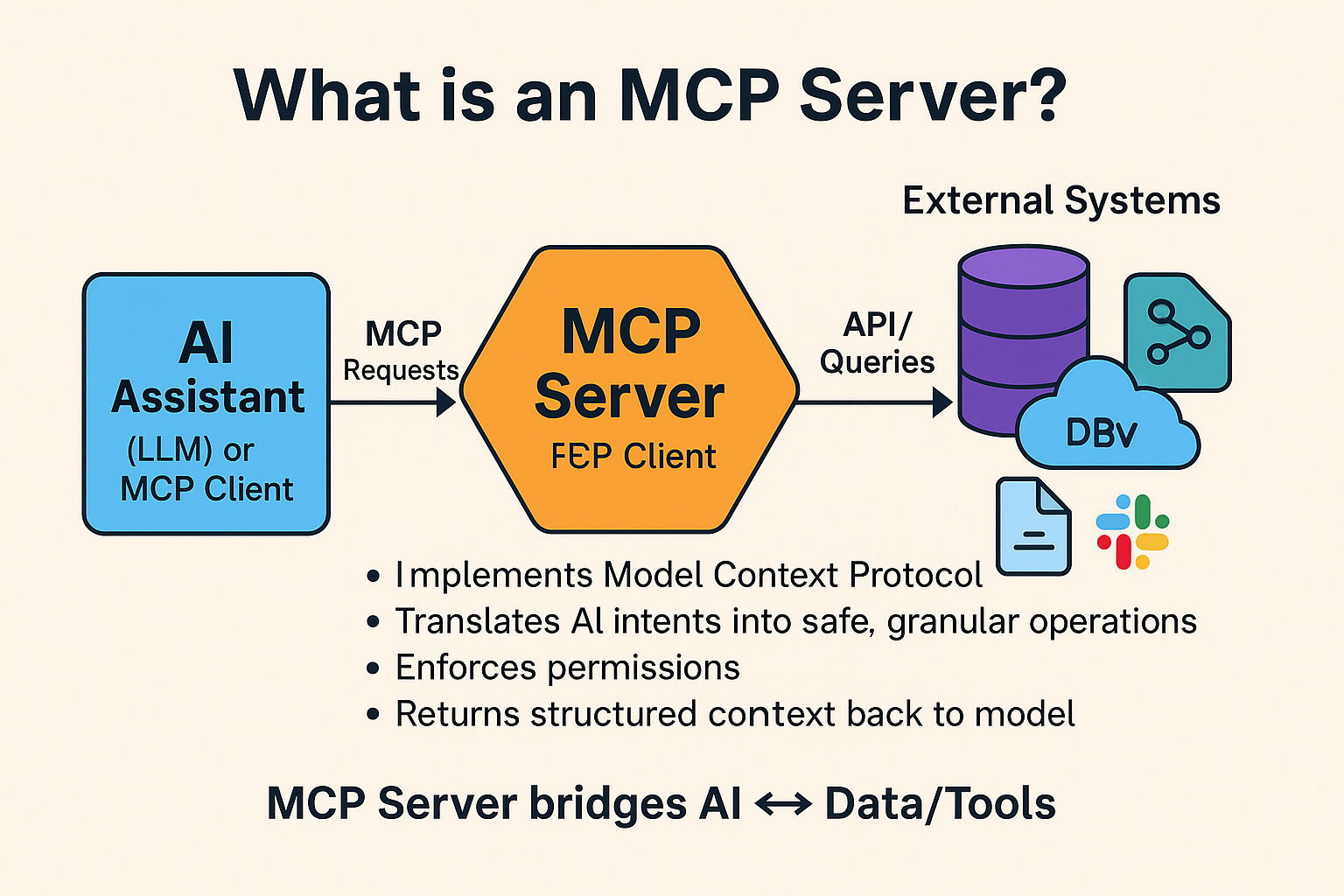
Model Context Protocol is an open standard that allows AI systems to securely connect with your business tools, databases, and applications. Think of it as a universal adapter that lets AI assistants actually do things—not just chat about doing things.
Here’s the business problem it solves: most AI implementations today are isolated. Your AI chatbot can’t access your CRM. Your coding assistant can’t check your production logs. Your data analyst can’t pull from multiple systems simultaneously. MCP changes this by creating a standardized way for AI to interact with your existing technology stack.
What makes MCP different:
- Standardized connections: Instead of building custom integrations for every AI tool, you set up MCP servers once and any MCP-compatible AI can use them
- Security by design: You control exactly what data and actions each AI agent can access—no carte blanche permissions
- Vendor independence: You’re not locked into a single AI provider’s ecosystem
- Real-time access: AI agents work with live data, not outdated snapshots or manual exports
I’ve seen companies spend six months building custom integrations for AI tools, only to switch providers and start over. MCP eliminates that waste.
Real-World Applications: Where MCP Makes Immediate Impact
Let me walk you through where I’m seeing MCP deliver measurable results, beyond the typical demo scenarios.
Customer Support Automation
An e-commerce client implemented MCP servers connecting their support AI to Shopify, Zendesk, and their shipping provider. The result? Their AI agent can now:
- Check real-time order status across systems
- Process refunds and exchanges without human escalation
- Update customer records while maintaining conversation context
- Pull product information and inventory data instantly
The impact: 60% reduction in average handling time for routine inquiries, and support staff freed up for complex issues that actually need human judgment.
Data Integration and Analysis
A financial services firm uses MCP to connect their data analyst AI to Salesforce, their data warehouse, and financial reporting tools. What used to require a data engineer writing SQL queries, exporting CSVs, and building dashboards now happens conversationally.
Here’s what changed:
- Sales leaders ask questions in plain English and get real-time analysis
- Cross-system reports that took 2-3 days now generate in minutes
- Analysts focus on interpretation rather than data wrangling
- Historical data and current pipeline data merge automatically
Internal Workflow Optimization
I worked with a SaaS company that connected MCP to their project management tools, code repositories, and documentation systems. Their engineering teams now have an AI assistant that can:
- Search across Jira, GitHub, and Confluence simultaneously
- Create tickets with proper formatting and links
- Update sprint boards based on code commits
- Generate release notes by analyzing actual changes
The time savings are real—about 4-5 hours per developer per week on administrative tasks.
Development and IT Operations
MCP servers connecting to cloud infrastructure, monitoring tools, and deployment systems let DevOps teams automate complex troubleshooting workflows:
- AI agents that can read logs, check metrics, and suggest fixes
- Automated incident response following established runbooks
- Infrastructure changes that follow approval workflows
- Documentation that updates itself based on actual system changes
The Business Case: ROI and Implementation Considerations
Let’s talk numbers and reality checks, because I’ve seen too many automation projects fail due to unrealistic expectations.
Cost-Benefit Framework
Initial implementation typically costs $15,000-$50,000 depending on complexity:
- MCP server setup and configuration: $5,000-$15,000
- Integration with existing systems: $10,000-$25,000
- Security review and compliance: $5,000-$10,000
- Training and documentation: $3,000-$8,000
Expected returns in year one:
- 20-30% reduction in time spent on routine data tasks
- 15-25% improvement in support response times
- 10-15% increase in team productivity from reduced context switching
- Measurable reduction in human error rates for repetitive tasks
Team Requirements and Skills Needed
You don’t need a team of AI researchers, but you do need:
- Someone who understands your current systems architecture (a senior developer or solutions architect)
- Basic familiarity with APIs and authentication flows
- A clear inventory of which systems need to connect
- Security expertise to review permissions and data access
Most organizations can implement basic MCP functionality with existing staff in 4-6 weeks.
Timeline Expectations
Here’s a realistic roadmap based on what I’ve observed:
- Weeks 1-2: System audit, security review, MCP server selection
- Weeks 3-4: Pilot implementation with 1-2 core systems
- Weeks 5-6: Testing, refinement, user training
- Weeks 7-8: Expanded rollout to additional teams
- Month 3+: Optimization and adding new connections
Common Pitfalls to Avoid
The mistakes I see most often:
- Starting too broad: Pick one high-value use case, nail it, then expand. Don’t try to connect everything at once.
- Ignoring change management: Your team needs to understand what the AI can and can’t do. Set clear expectations.
- Weak permission models: Start restrictive, then loosen permissions as you gain confidence. Not the reverse.
- No success metrics: Define what “working” means before you start—response time? Accuracy rate? User adoption?
Security and Governance: What CXOs Need to Know
This is where most executive conversations about AI automation get serious, and rightfully so.
Data Privacy Considerations
MCP’s architecture actually improves security compared to many current AI implementations:
- Explicit permission grants: Each MCP server defines exactly what data and actions are available
- No data pooling: Information isn’t aggregated into training data or shared across organizations
- Audit trails: Every AI action through MCP can be logged and reviewed
- Revocable access: You can disable an MCP connection instantly without touching your core systems
Access Control Best Practices
What I recommend for enterprise deployments:
- Implement role-based access at the MCP server level—not all AI agents should access all systems
- Use read-only connections initially, add write permissions only after proving value
- Require human approval for high-risk actions (financial transactions, data deletion, external communications)
- Set up automatic alerts for unusual access patterns or failed authentication attempts
Compliance Implications
If you’re in a regulated industry, here’s what you need to address:
- GDPR/CCPA: MCP servers can enforce data minimization—AI only accesses what’s needed for the specific task
- SOC 2/ISO 27001: MCP’s authentication and logging capabilities support compliance requirements
- Industry-specific: Healthcare (HIPAA), finance (SOX), and other sectors can implement appropriate controls at the MCP layer
Risk Mitigation Strategies
The risks aren’t zero, but they’re manageable:
- Sandbox environments: Test new MCP connections in isolated environments before production
- Rate limiting: Prevent AI agents from making thousands of API calls and hitting system limits
- Fallback procedures: Have manual processes documented for when automation fails
- Regular security reviews: Audit MCP server configurations quarterly, especially permission scopes
Getting Started: A Pragmatic Roadmap
Here’s how to move from “interesting concept” to “delivering value” without betting the farm.
Phase 1: Assessment (Week 1-2)
Start by answering these questions:
- Which repetitive tasks consume the most time across your organization?
- What systems do those tasks require accessing?
- Which of those systems have APIs or can support MCP servers?
- What’s the business impact of automating each task (hours saved, revenue protected, errors prevented)?
Create a simple matrix: effort to automate vs. business value. Focus on the high-value, low-effort quadrant.
Phase 2: Pilot Project Selection (Week 2-3)
Choose your first implementation based on these criteria:
- Clear success metrics: You can measure improvement objectively
- Low risk: Mistakes won’t cause customer-facing issues or data loss
- Enthusiastic users: Pick a team that wants this to succeed
- Manageable scope: Can be implemented in 4-6 weeks with existing resources
Examples of good pilot projects: internal IT support automation, sales data reporting, documentation search, development workflow assistance.
Phase 3: Implementation (Week 4-8)
Follow this sequence:
- Set up MCP servers for the 2-3 systems your pilot needs
- Configure authentication and basic permissions (read-only initially)
- Test with a small group of power users who understand the limitations
- Gather feedback and refine prompts, permissions, and workflows
- Document what works, what doesn’t, and why
- Gradually expand to the full pilot team
Phase 4: Measurement and Iteration (Week 9-12)
Track both quantitative and qualitative metrics:
- Time saved on specific tasks (before/after measurements)
- Error rates compared to manual processes
- User satisfaction and adoption rates
- Edge cases and failure scenarios
- Support burden (are you answering endless questions about how it works?)
Be honest about what’s not working. I’ve seen teams triple down on failing approaches because they’re committed to the technology rather than the outcome.
Phase 5: Scaling Strategy (Month 4+)
Only scale after proving value in your pilot:
- Identify 2-3 additional use cases with similar characteristics
- Create internal documentation and best practices based on pilot learnings
- Train additional teams on effective AI collaboration
- Establish a center of excellence or working group to share knowledge
- Budget for ongoing maintenance, updates, and expansion
Success Metrics to Track
Define these upfront and measure consistently:
- Adoption rate: What percentage of eligible users are actively using the MCP-enabled tools?
- Task completion rate: How often does the AI complete tasks without human intervention?
- Time savings: Actual hours saved (track this honestly—optimistic estimates kill credibility)
- Quality metrics: Error rates, customer satisfaction, or whatever quality means in your context
- ROI: Total cost (implementation + maintenance) divided by quantified benefits
The Strategic Perspective: MCP in Your 2025 Technology Stack
Let’s zoom out and look at where MCP fits in your broader automation and AI strategy.
Where MCP Fits in Your Automation Strategy
MCP isn’t replacing your existing automation—it’s the connective tissue between AI capabilities and your operational systems. Think of it this way:
- RPA tools: Still handle structured, rules-based processes where the logic is rigid
- Workflow platforms: Still orchestrate multi-step business processes with human checkpoints
- Traditional APIs: Still power your core system integrations
- MCP: Enables AI agents to leverage all of the above dynamically, based on context
In a previous consulting engagement, I saw a company use MCP to connect their AI assistant to both their RPA platform and their workflow engine. The result? The AI could decide which automation approach to use based on the specific request, and even trigger existing workflows when appropriate.
Integration with Existing Tools
MCP is designed to work alongside your current stack:
- Most modern SaaS platforms either have MCP servers available or can be connected through generic HTTP MCP servers
- Your internal tools can expose MCP endpoints without rebuilding entire systems
- Legacy systems can be connected through middleware or API gateways with MCP compatibility
- Your existing authentication and authorization systems (SSO, OAuth, API keys) work with MCP
The key advantage: you’re not replacing working systems. You’re making them accessible to AI in a controlled way.
Future-Proofing Considerations
Here’s what makes MCP a relatively safe bet for the next 3-5 years:
- It’s an open standard, not a proprietary protocol controlled by a single vendor
- Major AI providers (Anthropic, OpenAI, and others) are adopting it
- The architecture is extensible—new capabilities can be added without breaking existing implementations
- It’s based on proven patterns (HTTP, JSON-RPC) that developers understand
That said, the AI landscape moves fast. Build with the assumption that you might need to adapt or migrate, but MCP’s open nature minimizes lock-in risk.
When NOT to Use MCP
Be honest about these scenarios where MCP isn’t the right choice:
- Simple, static automations: If your process never changes and works fine with existing tools, don’t overcomplicate it
- Ultra-high-security contexts: If your compliance requirements prohibit any AI access to certain systems, respect that boundary
- Unstable or poorly documented systems: Connect the AI to chaos, and you get chaotic results. Fix the underlying systems first.
- Tasks requiring perfect accuracy: AI makes mistakes. If 99.9% accuracy isn’t good enough (medical dosing, financial compliance reporting), keep humans in the loop.
- When your team isn’t ready: Forcing AI adoption before your culture is prepared creates resistance and failed implementations
Conclusion: Taking the Next Step
MCP represents a shift from “AI as a chatbot” to “AI as a capable team member that can actually access and act on your business systems.” The technology works, the security model is sound, and the ROI is provable—if you approach implementation strategically.
Your next actions should be:
- Audit your current automation gaps and identify 2-3 high-value use cases
- Review which of your systems have API access and could support MCP connections
- Allocate 4-8 weeks for a focused pilot with clear success metrics
- Engage your security team early to address governance concerns upfront
- Start small, measure honestly, and scale based on proven value
The companies seeing real results aren’t the ones implementing MCP everywhere at once. They’re the ones that pick one meaningful problem, solve it well, learn from the experience, and then systematically expand.
The question isn’t whether AI automation through protocols like MCP will reshape how businesses operate—it’s whether you’ll be learning by doing in 2025, or playing catch-up in 2026.
Frequently Asked Questions
AI Agents & Automation
Smart autonomous agents for workflow automation, task execution, and real-time actions.

